
How to track personal bests: lifts, benchmark workouts and timers
Written by Kronos editorial team · How we write and check these guides
Updated October 27, 2026
“Personal best” sounds like one number. In practice it is three, because a squat, a benchmark workout and an interval timer are measured in different ways. Kronos keeps all three, and each comes from training you logged rather than a number you typed in:
- Lift records, from the sets you log: your heaviest set per exercise, with an estimated 1RM.
- Benchmark workout bests, from the score you confirm on a Library workout.
- Timer bests, per saved timer, from your runs of it.
They live in the Log tab under Records, and the workout recap tells you the moment you set one.
Lift records
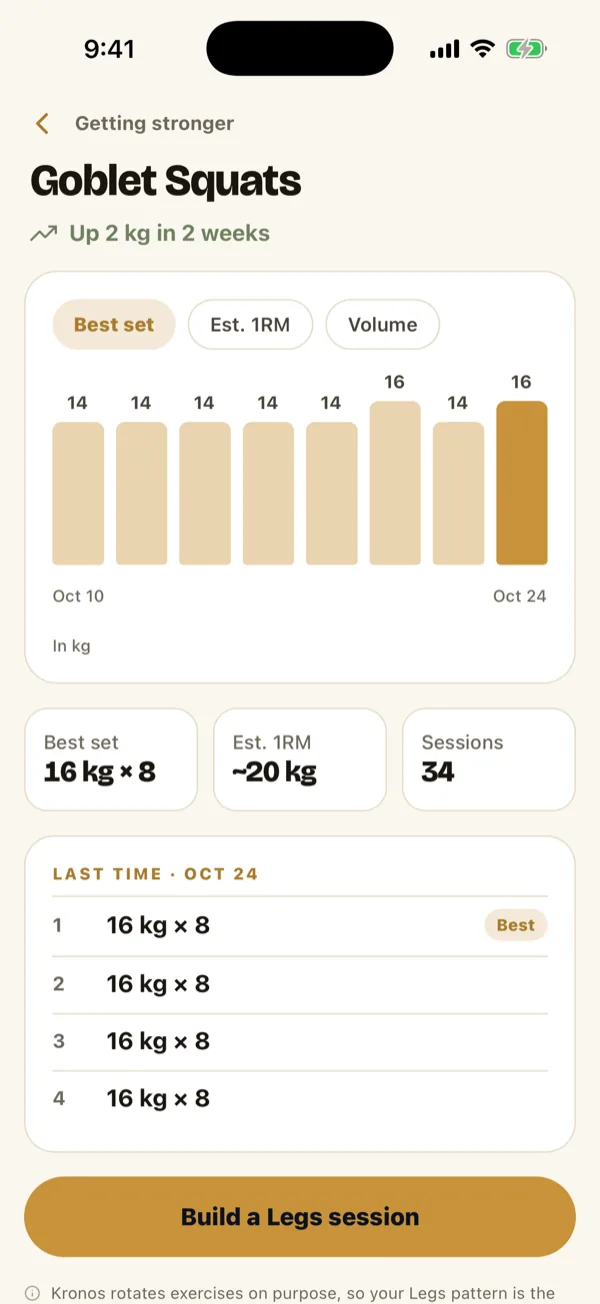
Every set you log with a weight counts. For each exercise, Kronos keeps your best set, ranked like this:
- Heavier wins. 82.5 kg for 3 beats 80 kg for 5.
- At the same weight, more reps win. 80 kg for 6 beats 80 kg for 5.
When you beat one, the recap says why: Heaviest yet, or Most reps yet at 80 kg. Your first logged set of an exercise sets the baseline; there is nothing to beat yet.
Next to each record is an estimated 1RM, worked out from the set. It is a useful trend line for comparing a set of 8 with a set of 3. It is not a tested max, so do not load a bar to it.
A few rules that decide whether a set lands in your records:
- Records count completed sessions only. Abandon a session and its sets stay out.
- Logging has to be on. You can switch logging off in Kronos, and then nothing is recorded.
- Confirm what you actually did. Kronos pre-fills each set from last time. If today was 5 reps, not 8, change it before you move on, or your record says 8.
- Loads are compared in your unit. Switch between kg and lb and your records still line up.
A free account shows your biggest records. Kronos Pro opens the full record book.
Benchmark workout bests
Some workouts are scored as a whole: rounds in a 20-minute AMRAP, or the time to finish a set amount of work. Kronos keeps those for the scored workouts in its Library, such as Cindy, Helen and The Mile.
When you finish one, the recap asks for your score, rounds and reps or a finish time, and you can enter it by hand. It then tells you where it sits: That is a new best, Ties your best, or under your best, but in the log.
What counts:
- A confirmed score. No score entered, no best.
- The workout as written. A scaled run counts as a run but does not earn the best. Change the movements and it becomes its own workout with its own history. That keeps a scaled Cindy out of the same column as the real one.
Timer bests
Run the same saved timer more than once and Kronos keeps a best for it. What “best” means depends on the format:
| Format | What counts |
|---|---|
| Intervals, Tabata | Completed intervals |
| EMOM | Completed minutes |
| AMRAP | Your confirmed rounds and reps |
| For time | Your confirmed finish time |
So finishing every interval of a Tabata is a best you can match but not beat; the AMRAP and For time bests are the ones that move. The recap tells you when you match one too.
Two things keep the comparison fair:
- Same timer, same settings. Change the work time or rename the timer and Kronos treats it as a new timer with its own history.
- The clock is not the work. A completed interval means the clock ran its course. Whether every rep happened is on you.
Timer history needs you to be signed in. Every signed-in member sees each timer’s best and recent runs; Kronos Pro adds the full run list, the trend and a suggested next step. The interval timer itself is free forever.
What you cannot do
- Type in a PR on its own. There is no field for “I squatted 120 kg last year”. Lift records come from logged sets only.
- Import your old log. Kronos imports plans and workouts to train from, not a history of workouts you did in another app.
- Record a 5k or a mile time freehand. A timed run only counts as a best if you run it as a Library workout such as The Mile.
Getting started
Log your main lifts for a couple of weeks and Records fills itself. Running a workout from somewhere else? Sets you log in an imported plan or a pasted workout count toward your records the same way.
The questions people ask next
How do I log personal bests in Kronos?
You log the workout, and the bests come from it. Lift records come from the sets you log, benchmark bests from the score you confirm on a Library workout, and timer bests from your runs of a saved timer. There is no field for typing in a PR by itself.
What counts as a lift PR?
The heavier set wins. At the same weight, more reps win. Kronos also shows an estimated one rep max from your best set, which is an estimate, not a tested max.
Can I enter a benchmark score by hand?
Yes. When you finish a Library workout that has a score, the recap asks for it: your rounds and reps, or your finish time. A best counts only from a confirmed score on the unedited workout.
Does a workout timer keep personal bests?
The Kronos timer does, per saved timer, once you are signed in. Intervals and Tabata count completed intervals, EMOM counts completed minutes, AMRAP counts your confirmed rounds and reps, and For time counts your confirmed finish.