How to turn an AI workout into a timer you can run
Written by Kronos editorial team · How we write and check these guides
Updated October 27, 2026
Copy the workout out of your AI chat, open Kronos, and paste it into Import a workout on the Timer tab. Kronos reads the moves, the work and rest times and the rounds, shows you what it read, marks anything it had to fill in, and hands you a Start button. A simple interval workout comes back as a timer. A richer one, with sets and loads, comes back as a full workout and runs in the player.
There is no integration involved. You copy text and paste it, the way you would into a notes app. That is also why it works with whatever AI you use.
Step 1: get a workout worth pasting
Any clear workout text works. The cleaner the text, the less Kronos has to guess. Here is a sample we wrote for this page, the kind of thing an AI hands back when you ask for “a 25-minute dumbbell session”:
Lunch Twenty-Five
Warm-up: 4 min, arm circles, hip hinges, bodyweight squats
Intervals: 4 rounds, 40s work, 20s rest
- Goblet squat
- Push-up
- Dumbbell row
- Plank
Rest 2 min
Strength: 3 sets of 8, 90s rest
- Dumbbell Romanian deadlift
Finisher: 5 min AMRAP
- 10 reverse lunges
- 10 mountain climbers
Cool-down: 3 min easy stretching
If you are still in the chat, there is a shortcut. The import screen has a Using an AI? Copy the Kronos format link. It copies a prompt you paste back into the chat, and the AI rewrites the workout in a layout Kronos reads without guessing.
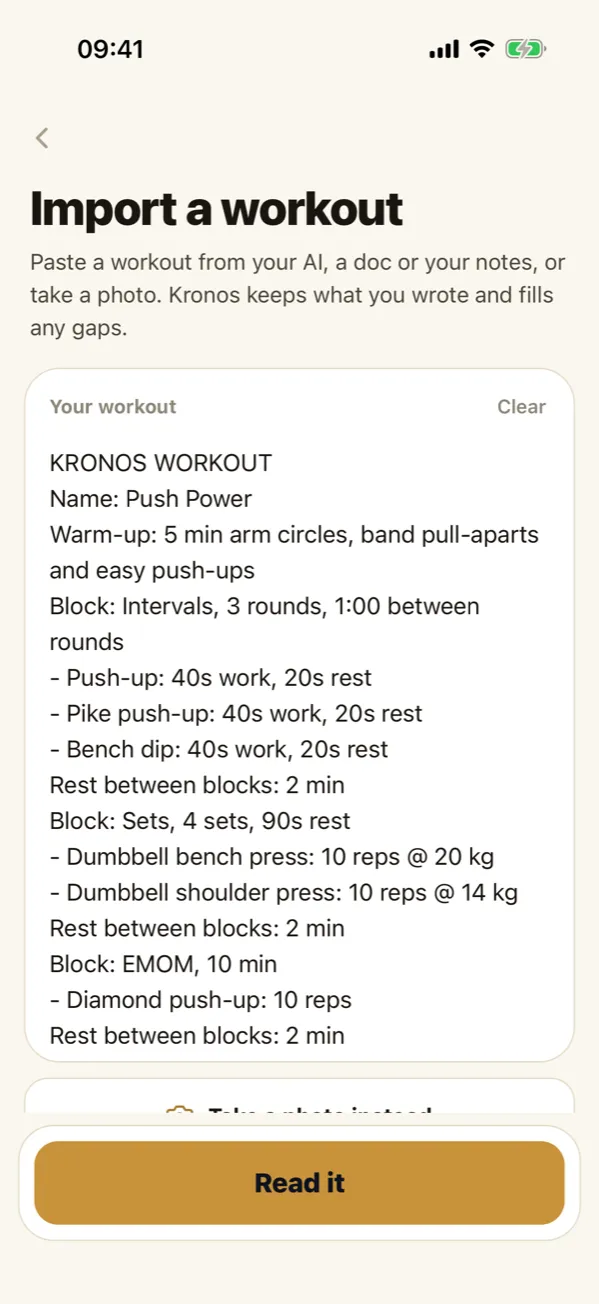
Step 2: paste it and tap Read it
Timer tab, then Import a workout. Tap Paste, check the text landed, then Read it. You need a free account for this step, and a connection, because the reading happens on our server.
Step 3: check what Kronos read
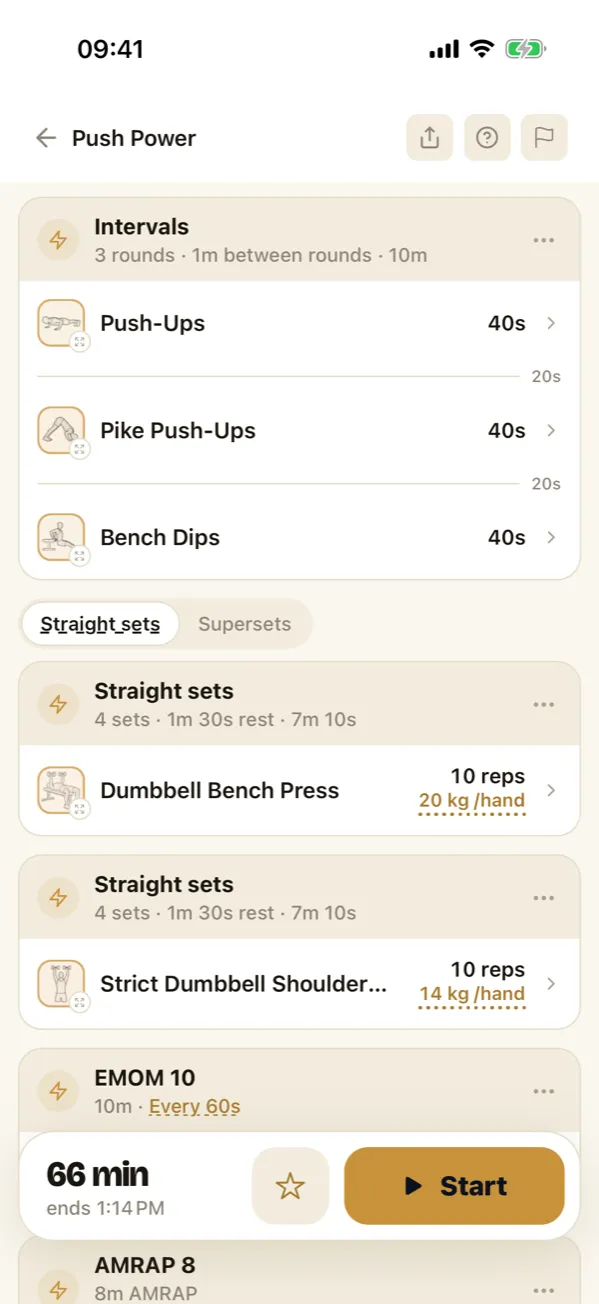
This is the step that matters. What comes back is your workout, not a new one: same moves, same order, same times. Where your text left something out, such as a load, a rest or a rep count, Kronos fills a sensible value and draws it with a dotted underline, so you can tell at a glance which numbers you wrote and which it picked. Tap any dotted value to change it.
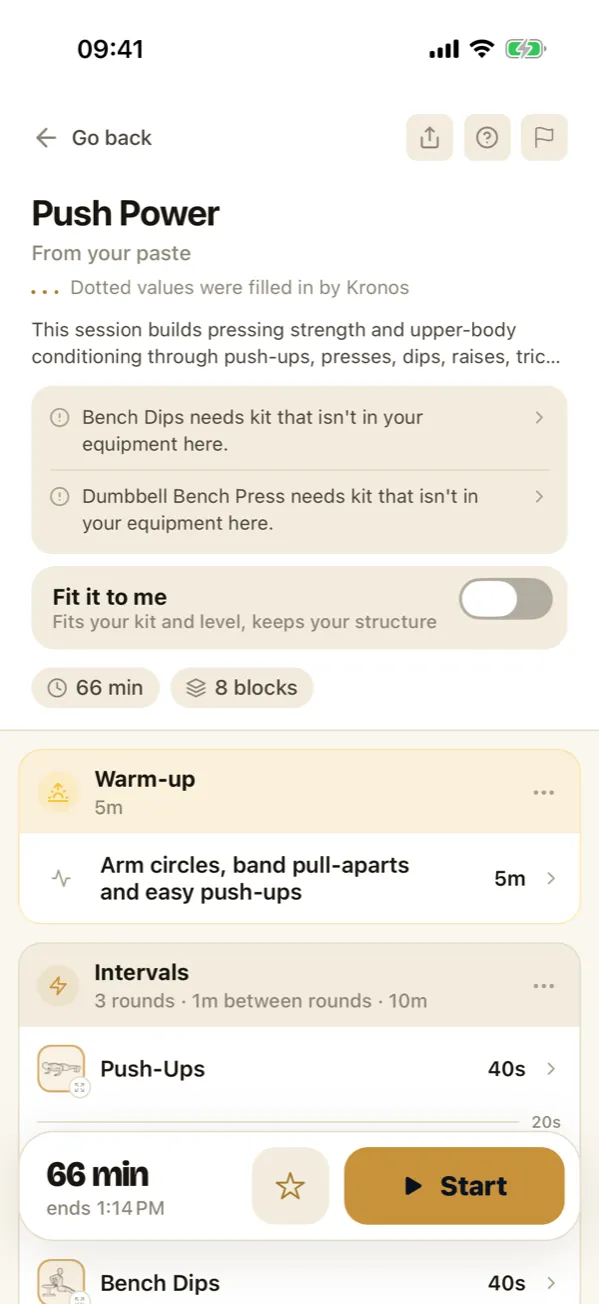
Above the blocks you may see a few notes. A common one: a move needs kit that is not in your equipment for where you are training. You can swap it by hand, or turn on Fit it to me, which swaps what your kit cannot do and keeps the structure you pasted. It is off unless you turn it on.
Step 4: timer or full workout
What you get depends on what you pasted.
- A simple interval workout, such as “8 rounds, 30 seconds on, 15 seconds off”, opens in the timer’s own setup form, already filled in. Save it as a preset and it sits beside your other timers.
- Anything richer, like the sample above with its strength sets, AMRAP finisher and several blocks, opens as a full workout on the review screen. It runs in the workout player: block by block, with the work, the rest and what comes next on screen. If you log sets, the strength blocks ask for them.
Either way, press Start.
What to check before you trust it
- The total time. An AI is generous with exercises and stingy with transitions. The review shows the real length, rests included. If 25 minutes became 38, cut a round.
- Per side moves. “10 reverse lunges” can mean 10 in total or 10 each leg. Decide which you meant.
- Load. If the AI wrote “moderate dumbbells”, Kronos fills a number. It is a starting point, not a prescription for you specifically.
- The weird one. If a move is not one Kronos knows, it keeps it and runs it as you wrote it, with your name for it.
What it costs
The import row in the app puts it in four words: free to read, Pro to run. Running an imported workout, timer-shaped or not, is part of Kronos Pro. A timer you type in yourself is different: the Kronos interval timer is free forever.
If your workout is on paper rather than in a chat, the photo guide covers whiteboards and notebooks. If the AI wrote you several weeks rather than one session, import it as a plan instead, and the import page shows both routes side by side.
The questions people ask next
Can I turn a workout from an AI chat into a timer?
Yes. Copy the workout text, open Kronos, tap Import a workout on the Timer tab and paste it. Kronos reads the moves, times and rounds, marks anything it filled in, and gives you a session to check before you press Start.
Is Kronos connected to my AI account?
It can be. Kronos is in the ChatGPT and Claude directories, and either can send workouts and plans straight to it. If you paste instead, nothing is linked and Kronos only sees what you paste.
Does every imported workout become a simple interval timer?
No. A plain work-and-rest workout comes back as a timer. One with sets, reps, loads or several different blocks comes back as a full workout and runs in the workout player.
Is running an imported workout free?
Running an imported workout is part of Kronos Pro. A timer you set up yourself in the Kronos interval timer is free forever.